In this post I will cover how I use Azure Logic Apps to send and retrieve AS2 EDI files using a couple Azure Logic Apps. I am writing this post to share some of my experiences and to provide more practical details than what is currently provided in the Microsoft Learn guides.
What we will cover
What is AS2?
Before we get into how we are going to build the solution, lets take a movement to define what we are talking about.
In the EDI (Electronic Data Interchange) world, AS2 (Applicability Statement 2) is a protocol used to securely transmit EDI documents and other business data over the internet. AS2 enables the exchange of data using HTTP or HTTPS, providing encryption, digital signatures, and receipt notifications (MDNs) to ensure data integrity, confidentiality, and non-repudiation.
Why use Azure Logic Apps?
There are some great B2B EDI and MFT providers out there, so why build a bespoke solution using Azure Logic Apps?
Well I can’t answer that question for you, but for my requirements which are pretty basic I only need a single partner and nothing fancy. Azure delivered the following benefits for me.
- An Azure solution came out fair cheaper than my previous off the shelf solution.
- I could ditch a couple Linux servers, a load balancer, backups and all the other infrastructure complexity required for my previous solution.
- As it is a Logic App I can use a host of actions of trigger as part of the EDI flow to perform follow on steps like sending email notifications or triggering other flows.
Resources for the solution
To build this example solution we will be creating a few resources:
- A Self Signer Certificate – For our side of the AS2 connection we need a private/public key to encrypt and decrypt the data.
- An Azure Integration Account – This folds the properties on the AS2 partner(s) including their certificates along with our AS2 properties.
- A Storage Account – To hold our files to send and where our received files will be placed.
- A Key Vault – Required to hold our private key certificate.
- A Logic App to Receive AS2 Files – On retrieving an HTTP trigger will decode the AS2 date and create a blob file in our Storage Account. If the partner requests an MDN receipt, one will be send.
- A Logic App to Send AS2 Files – On a set interval will get files from a “Send” folder on our storage account, encode and transmit the AS2 data and store and MDN receipt if one is provided by the parter.
Costs
Your costs will depend on the number of trending partners you require and the volume of files transmitted. As the time of writing the following was correct.
Log Analytics Workspace (optional)
I am using the Pay As Go tier with Analytics logs, so I get altering and 30-90 days retention $2.30 per GB. I have never gone over a single GB in a month for this solution. https://azure.microsoft.com/en-gb/pricing/details/monitor/
Storage Account
This solution used Hierarchal Namespace, beyond that you costs will depend on how much data you intend to retain and the level of redundancy you require. My costs are a few cents a month.
Logic Apps
I am using the consumption tier, so I am only paying for what I need making my Logic Apps costs virtually nothing. However, if you need more performance or some additional feature check out the costs of the standard tier https://learn.microsoft.com/en-us/azure/logic-apps/single-tenant-overview-compare
Integration Account
This is where the real costs kick in!
I found it pretty difficult to get any clear information on how the pricing works for Integration Accounts, but after a lot of digging and experimenting and seeing what I was being charged, this is what I found
There are currently three tiers (Free, Basic and Standard) with a four Premium tier in preview at the time of writting.
They are charged at an hourly rate, but you seem to be charged for each our the integration account is attached to a Log App. As most people will leave the Integration Account hooked up 24/7, you can expect to pay $300 a month for basic or $1,000 a month for Standard.
The free plan as the name suggests is free and has all the features required for this guide., but should not be used for production workloads according to Microsoft.
I use the Free plan for my dev and test partner connections and a basic Integration Account for my production connection.
Free would let you have 9 AS2 partners, Basic 1 partner and Standard unto 1,000 partners.
Building the solution
Creating a self-signed certificate (Using PowerShell)
You could use a public certificate, but for the purposes of this guide a self signed certificate will suffice. Make sure you keep a note of the password you use for the private key
Creating and exporting the public key
The below will generate a certificate with a key with a 5 year expiry and exports the public key that we can give to our partner
$certname = "as2.domain.tld"    ## Replace with your certificate name
$exportLocation = "C:\Mycert" ## Replace with where you want to export the certificate to

$cert = New-SelfSignedCertificate -Subject "CN=$certname" -CertStoreLocation "Cert:\CurrentUser\My" -KeyExportPolicy Exportable -KeySpec Signature -KeyLength 2048 -KeyAlgorithm RSA -HashAlgorithm SHA256 -NotAfter (Get-Date).AddYears(5)

Export-Certificate -Cert $cert -FilePath "$exportLocation\$certname.cer"
Exporting the private key
$mypwd = ConvertTo-SecureString -String "{myPassword}" -Force -AsPlainText  ## Replace {myPassword} with a secure password
Export-PfxCertificate -Cert $cert -FilePath "$exportLocation \$certname.pfx" -Password $mypwd
Don’t send the private key with your partner!
Creating a Storage Account
I won’t cover this in detail, but for this example you will need Storage Account to hold the files to send and the received files.
Creating the Integration Account
Over on the Azure admin portal we are going to create an Integration account containing our partner connection, the third parties partner connection and an agreement defining the required AS2 properties agreed with your AS2 partner, such as the encryption level and if an MDN receipt is required.
Certificates
- Add your previously created self-signed private certificate. You can either upload it or link to a Key Vault
- Add you partners public certificate
Partners
- Add a partner connection for your side
- Add a “Qualifier” as “AS2Identity” and set the value as your AS2 Identify, the value you use can we anything but your AS2 partner will need to know what you have set.
- Add a partner connection for your AS2 parter
- Add a “Qualifier” as “AS2Identity” and set the values as your partners AS2 identify
Agreement
You will need to pre agree with your AS2 partner on if an MDM is required, if the MDM should be signed and what level of encryption you will be using.
- Add a new agreement to define the agreed properties of the connection
- Host Partner: Is your side, the previously created partner name
- Host Identity: Is your AS2 Identity
- Guest Partner: Is your previously createdAS2 partner
- Guest Identity: You AS2 partners identity
- Receive Settings:
- Message should be signed: This is your partners certificate
- Message should be encrypted: This is your certificate
- If required set the MDM properties including the signing MIC Algorithm
- Send Settings:
- Enabled Message Signing: If required select the algorithm and you will sign with your certificate
- Enable Message Encryption: Select eh algorithm and you will encrypt with you AS2 partners public certificate
- For my below Logic App example I have Unfold HTTP headers and Transmit file name in MIME header checked
Creating the Receive Logic App
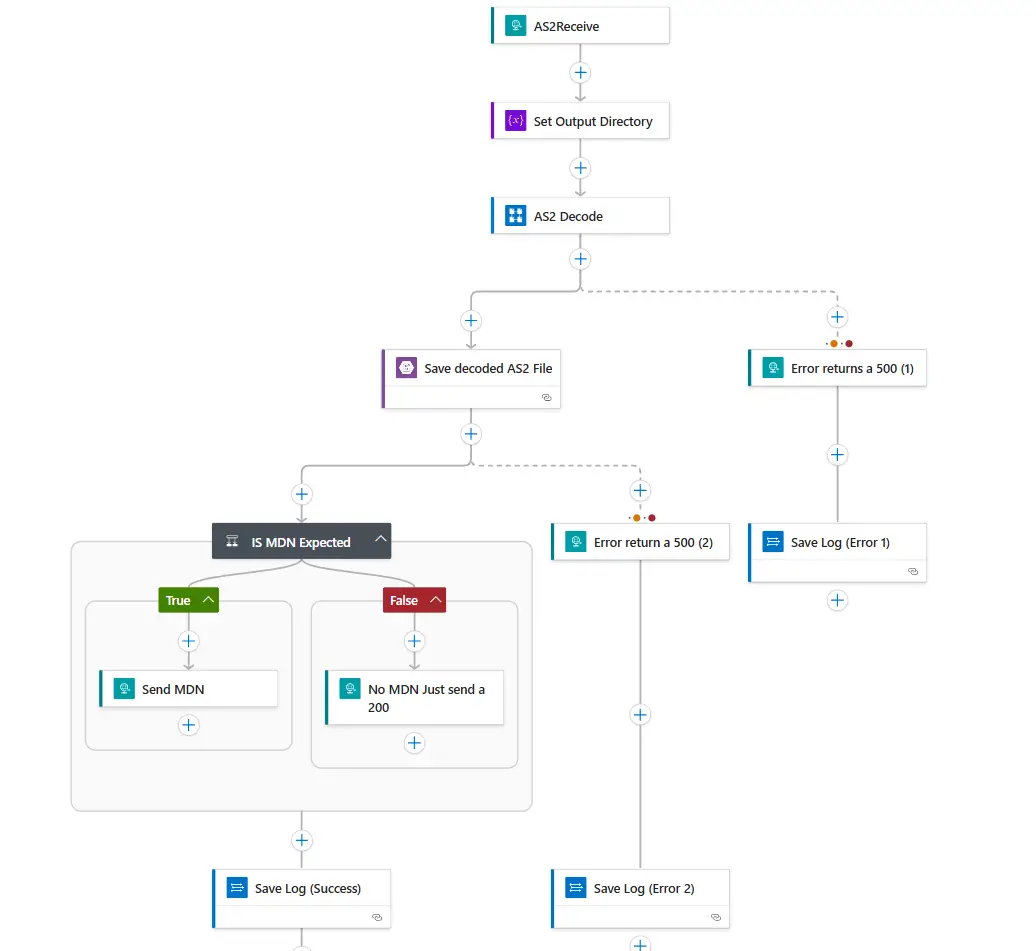
When building the Log App we need to using the “AS2 Decode” activity. AS2 Decode will use the properties we have in our integration account to decrypt the data posted to the Logic App.
The AS2 Decode activity will also generate a MDM header and body, depending on what is set in the Integration Account
Once the posted data is decoded we can save it to a file or do other things with it.
I wont go over this in too much detail, but below is a screenshot of a basic AS2 receive pattern. If you would like specific details please comment.
Creating the Send Logic App
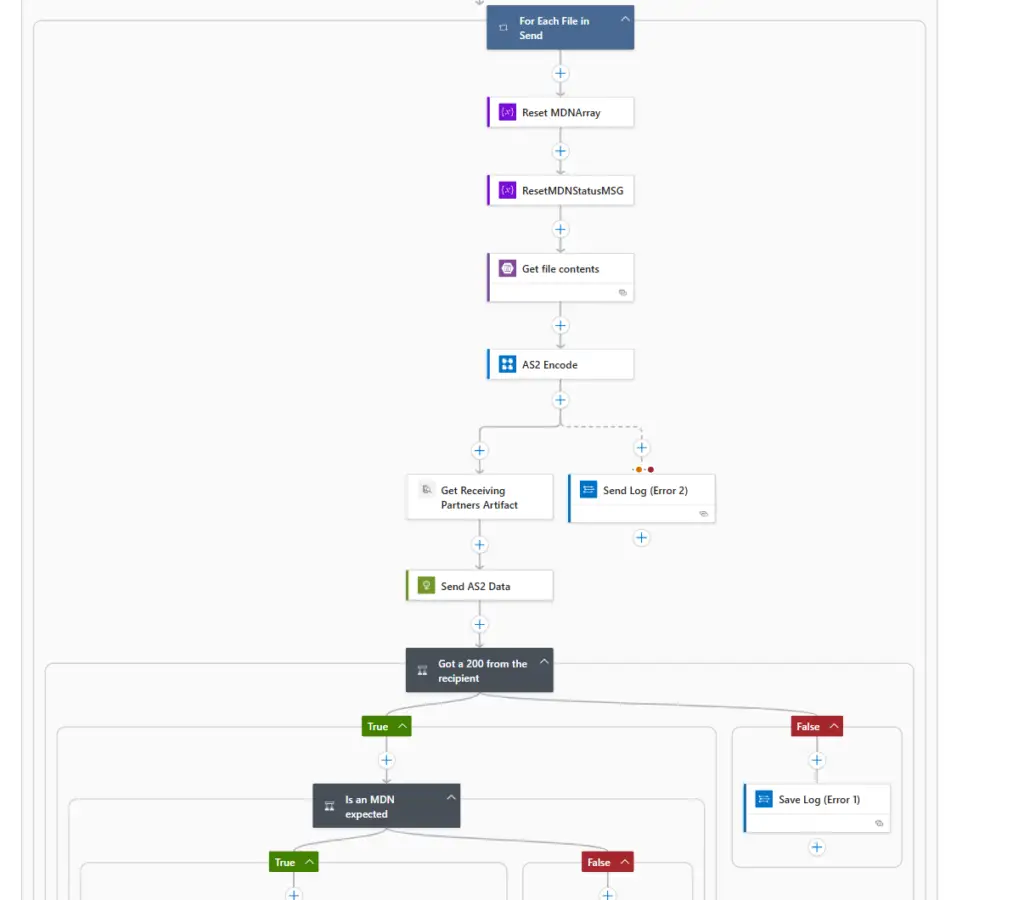
For the send I run the Logic App with a recurrence trigger collecting all files queued in a ready to send folder. A for each loop then pick up each file and uses the “AS2 Encode” activity to encrypt the file and if required generate an MDM.
As with the receive, I wont go over this in too much detail, but below is a screenshot of a basic AS2 send pattern. If you would like specific details please comment.